What it actually takes to build an AR overlay on a physical object in real time.
AR on physical objects is 80% coordinate system problems. Claude is great at helping you think through the geometry. You still have to understand it yourself.
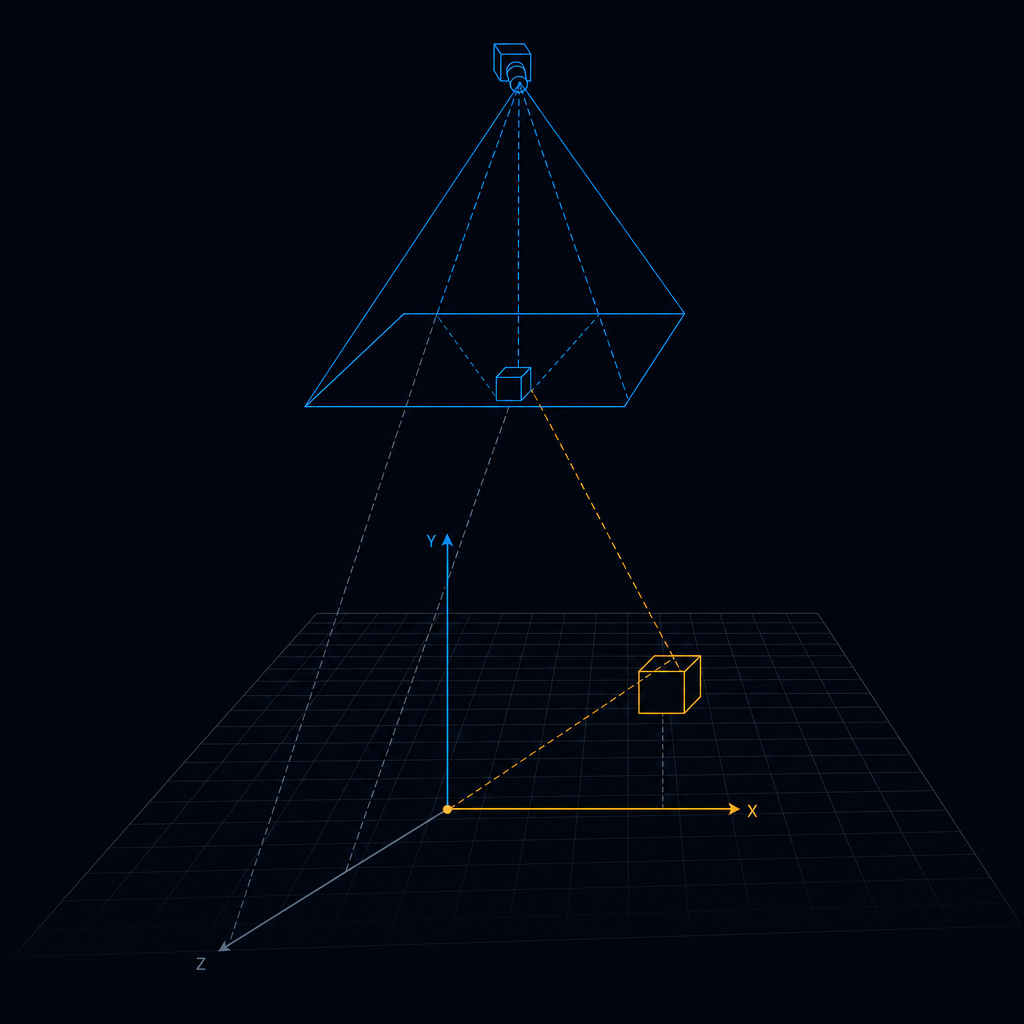
When people ask what Quantum Caddy is, I say it's a real-time AR scoring system for cornhole. That description gets a quick nod. What they picture is the finished demo — a bag lands, a score pops up, a coaching callout floats above the board. What they don't picture is the coordinate system problem underneath it.
The coordinate system problem is where most of the real work lives.
The core issue
Here's the core issue. A camera sees a 2D image. A bag lands on a 3D physical board. To display an AR element anchored to a real-world position, you have to solve for the relationship between pixel space and physical space. Get it wrong by two centimeters and a zone label that should read "right gutter" floats over center board. The displayed data lies about the actual throw. For a scoring system players trust, that's not cosmetic.
Our current production stack is still Phase 0, which means it runs on a desktop-class edge unit with two cameras — a Reolink board camera and a front camera for trajectory — and the AR surface is Mission Control, a browser-based dashboard. That's not glasses. It's not projection. It's a screen. The coordinate work we've done so far is a 2D homography: we use four board corners as calibration anchors, compute the transformation matrix once at session start, and from then on every detected bag position gets mapped from pixel space to a normalized board coordinate system. That gives us zone-level accuracy — we can say with confidence whether a bag landed in zone 3 or zone 7 — which is what Phase 0 required.
But zone-level accuracy isn't what Phase 2 requires. Phase 2 is glasses.
The Phase 2 problem
The Everysight Maverick AI is our engineering target for Phase 2. 47 grams, 5000-nit color OLED, GazeIntent eye tracking. When a bag lands, the score should appear anchored to the board — not floating somewhere in ambient space. That requires knowing where the board is relative to the wearer's head in 3D at all times. Not a static calibration matrix. A live spatial anchor that updates as the player moves.
The architectural shift is significant. Right now the cameras are fixed, the board is fixed, the transform is static. In a glasses setup, the camera moves with the player's head. The board stays fixed in the world. The system has to maintain a live world-model — board position in 3D space updated from head pose — serving as the anchor point for every AR element.
The design we built with Claude
We built the conceptual architecture for this with Claude. WorldState holds the canonical board position. TrajectoryRuntime runs a Kalman filter on the front camera for the parabolic arc. GlassesAdapter translates game events into HUDCommand objects for the display hardware. GazeEventAdapter converts GazeIntent dwell events into UI interactions. A continuous two-second background model loop generates coaching chips proactively — glasses have no keyboard input in a loud venue.
None of this is shipped. This is the design.
What's real right now: the board calibration geometry is validated. board_calibrator.py computes a homography from four corner markers and stores a geometric constant in board_calibration.json. The perception layer uses this to translate bag bounding boxes into zone coordinates correctly. 15/15 Phase 0 gate tests passed on April 6. The scoring is correct. The move from fixed-camera 2D homography to moving-camera 3D spatial anchoring is the work ahead.
Where Claude helped and where it couldn't
Claude helped most in the design phase. When I described the coordinate frame problem — camera space, board space, world space — it worked through the transformation chain with me in a way that was genuinely useful. It identified the Kalman filter for trajectory smoothing before I brought it up. It flagged that the 28-degree field of view on the Maverick creates a hard constraint for UI density: everything that might push an overlay toward the edge of the FOV needs a fallback position in center or peripheral space. That kind of geometry reasoning across multiple coordinate frames is where the tool adds real leverage.
Where it couldn't substitute: understanding what's correct. The calibration accuracy ultimately depends on me knowing that four corners are enough to define a planar homography and understanding when that model breaks — when the board isn't actually planar, when camera angle is too oblique for stable corner detection, when frame rate drops create stale calibration states. I had to bring that domain understanding. Claude could implement what I described. It couldn't tell me what to describe.
The edge case that will get you
The thing I'd flag for anyone building spatial AR. Most of the hard cases aren't in the center of the frame. They're at the edges — bags partially off-board, hole-edge detections, objects in the corners where lens distortion is highest. A homography accurate at center can be a full zone wrong at the edges. We caught this during Phase 0 and it took a dedicated calibration refinement sprint to fix.
The bar for Phase 2 isn't "display data near the board." It's display data that appears to sit on the board regardless of where the player is standing. That requires the world-model, the Kalman filter, and the GlassesAdapter in under 400 milliseconds from bag-land to AR element displayed. We're not there yet. The geometry problem is the same regardless of which glasses hardware we pick. The path is clear.
--- *Filed from the QC lab. The distance between "bag lands on board" and "score badge anchored to that exact spot in 3D" is about six months of work that nobody shows you in the demo.*